内置的 collections 包提供了几种专门的、灵活的集合类型,这些集合类型不仅性能高,而且可以替代 dict、list、tuple 和 set 等一般集合类型。该模块还定义了描述不同类型集合功能的抽象基类(如 MutableSet 和 ItemsView)。
Section 47.1: collections.Counter
Counter 是一个 dict 子类,可让您轻松地对对象进行计数。它拥有处理计数对象频率的实用方法。
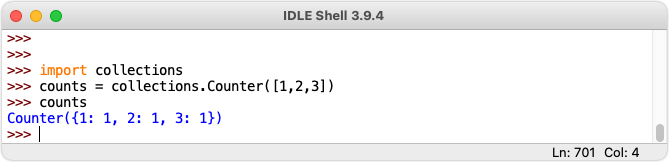
import collections
counts = collections.Counter([1,2,3])
上述代码创建了一个名为 counts 的对象,它包含了传给构造函数的所有元素的频率。
此示例的值为 Counter({1: 1, 2: 1, 3: 1})
构造函数示例
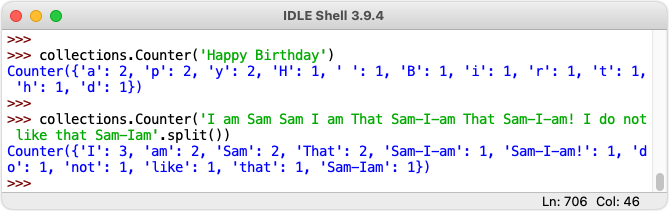
字母计数器
>>> collections.Counter('Happy Birthday')
Counter({'a': 2, 'p': 2, 'y': 2, 'i': 1, 'r': 1, 'B': 1, ' ': 1, 'H': 1, 'd': 1, 'h': 1, 't': 1})
单词计数器
>>> collections.Counter('I am Sam Sam I am That Sam-I-am That Sam-I-am! I do not like that Sam-Iam'.split())
Counter({'I': 3, 'Sam': 2, 'Sam-I-am': 2, 'That': 2, 'am': 2, 'do': 1, 'Sam-I-am!': 1, 'that': 1, 'not': 1, 'like': 1})
Recipes
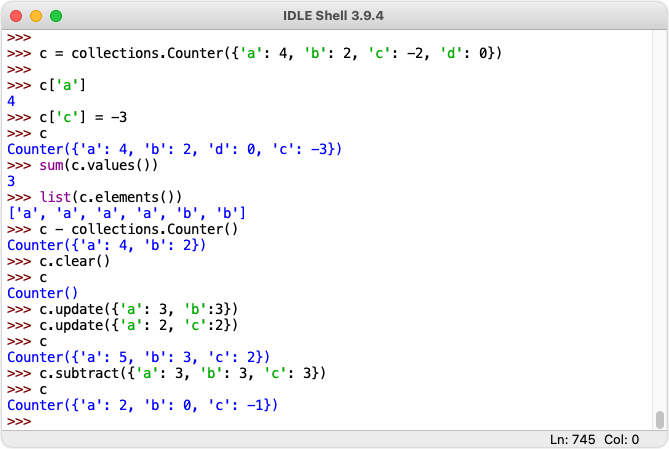
>>> c = collections.Counter({'a': 4, 'b': 2, 'c': -2, 'd': 0})
获取单个元素的计数
>>> c['a']
4
设置单个元素的计数
>>> c['c'] = -3
>>> c
Counter({'a': 4, 'b': 2, 'd': 0, 'c': -3})
获取计数器中元素的总数 (4 + 2 + 0 - 3)
>>> sum(c.values()) # negative numbers are counted!
3
获取元素(只保留计数器为正的元素)
>>> list(c.elements())
['a', 'a', 'a', 'a', 'b', 'b']
删除数值为 0 或负数的键
>>> c - collections.Counter()
Counter({'a': 4, 'b': 2})
删除所有内容
>>> c.clear()
>>> c
Counter()
添加、删除单个元素
>>> c.update({'a': 3, 'b':3})
>>> c.update({'a': 2, 'c':2}) # adds to existing, sets if they don't exist
>>> c
Counter({'a': 5, 'b': 3, 'c': 2})
>>> c.subtract({'a': 3, 'b': 3, 'c': 3}) # subtracts (negative values are allowed)
>>> c
Counter({'a': 2, 'b': 0, 'c': -1})
Section 47.2: collections.OrderedDict
Python 字典中键的顺序是任意的:它们不受添加顺序的限制。
例如
>>> d = {'foo': 5, 'bar': 6}
>>> print(d)
{'foo': 5, 'bar': 6}
>>> d['baz'] = 7
>>> print(d)
{'baz': 7, 'foo': 5, 'bar': 6}
>>> d['foobar'] = 8
>>> print(d)
{'baz': 7, 'foo': 5, 'bar': 6, 'foobar': 8}
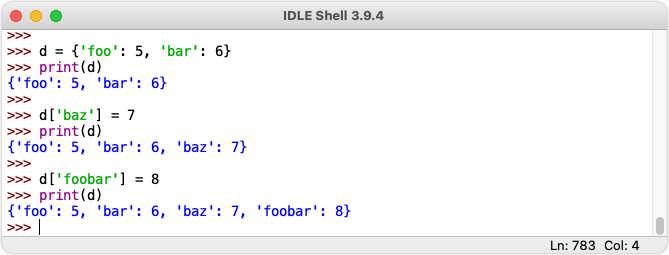
(上面隐含的任意排序意味着你可能会得到与上面代码不同的结果)。
键出现的顺序就是对它们进行迭代的顺序,例如使用 for 循环。
collections.OrderedDict 类提供了保留键顺序的字典对象。OrderedDicts 可以如下所示用一系列有序项(这里是一个元组键值对列表)创建:
>>> from collections import OrderedDict
>>> d = OrderedDict([('foo', 5), ('bar', 6)])
>>> print(d)
OrderedDict([('foo', 5), ('bar', 6)])
>>> d['baz'] = 7
>>> print(d)
OrderedDict([('foo', 5), ('bar', 6), ('baz', 7)])
>>> d['foobar'] = 8
>>> print(d)
OrderedDict([('foo', 5), ('bar', 6), ('baz', 7), ('foobar', 8)])
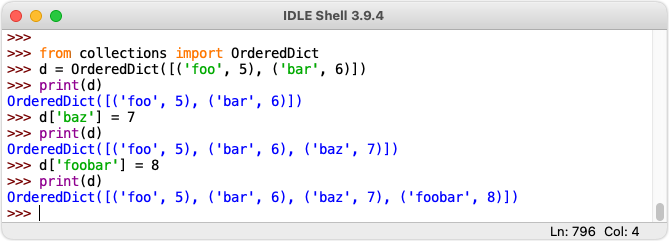
或者,我们可以创建一个空的 OrderedDict,然后添加项目:
>>> o = OrderedDict()
>>> o['key1'] = "value1"
>>> o['key2'] = "value2"
>>> print(o)
OrderedDict([('key1', 'value1'), ('key2', 'value2')])
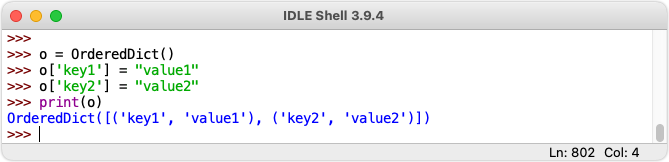
遍历 OrderedDict 可以按照键的添加顺序进行访问。
如果我们为现有键赋值,会发生什么情况?
>>> d['foo'] = 4
>>> print(d)
OrderedDict([('foo', 4), ('bar', 6), ('baz', 7), ('foobar', 8)])

键将保留其在有序字典中的原始位置。
Section 47.3: collections.defaultdict
collections.defaultdict(default_factory)返回dict的子类,该子类有一个缺失键的默认值。参数应该是一个函数,在不带参数调用时返回默认值。如果没有传递任何参数,则默认为 None。
>>> state_capitals = collections.defaultdict(str)
>>> state_capitals
defaultdict(<class 'str'>, {})

返回对 defaultdict 的引用,defaultdict 将使用 default_factory 方法创建字符串对象。
defaultdict 的典型用法是使用内置类型之一,如 str、int、list 或 dict 作为 default_factory,因为这些类型在不带参数的情况下调用时会返回空类型:
>>> str()
''
>>> int()
0
>>> list()
[]
使用不存在的键调用 defaultdict 不会像普通字典那样产生错误。
>>> state_capitals['Alaska']
''
>>> state_capitals
defaultdict(<class 'str'>, {'Alaska': ''})
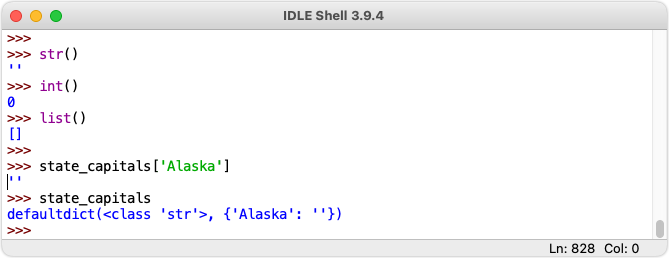
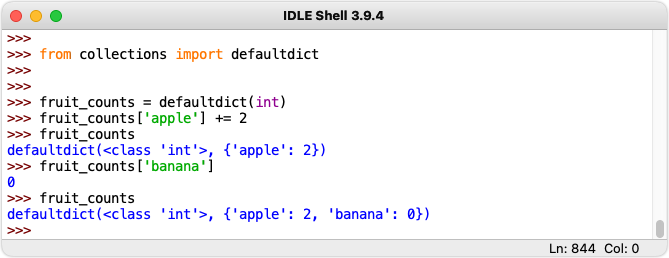
另一个例子是 int:
>>> fruit_counts = defaultdict(int)
>>> fruit_counts['apple'] += 2 # No errors should occur
>>> fruit_counts
default_dict(int, {'apple': 2})
>>> fruit_counts['banana'] # No errors should occur
0
>>> fruit_counts # A new key is created
default_dict(int, {'apple': 2, 'banana': 0})
普通字典方法使用默认字典
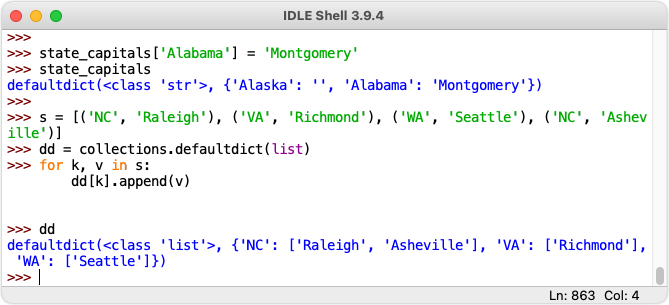
>>> state_capitals['Alabama'] = 'Montgomery'
>>> state_capitals
defaultdict(<class 'str'>, {'Alabama': 'Montgomery', 'Alaska': ''})
使用 list 作为 default_factory 会为每个列表创建一个新键。
>>> s = [('NC', 'Raleigh'), ('VA', 'Richmond'), ('WA', 'Seattle'), ('NC', 'Asheville')]
>>> dd = collections.defaultdict(list)
>>> for k, v in s:
...     dd[k].append(v)
>>> dd
defaultdict(<class 'list'>,
            {'VA': ['Richmond'],
             'NC': ['Raleigh', 'Asheville'],
             'WA': ['Seattle']})
Section 47.4: collections.namedtuple
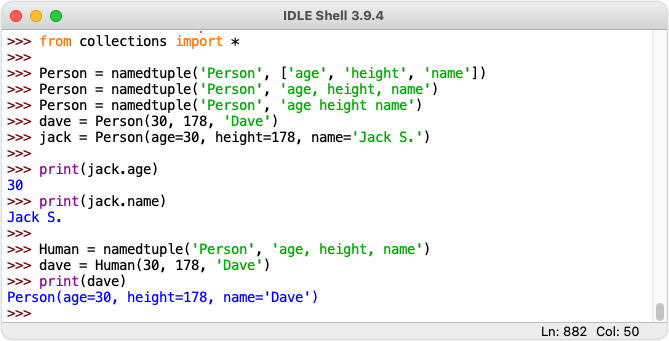
使用 namedtuple 像这样定义新的 Person 类型:
Person = namedtuple('Person', ['age', 'height', 'name'])
第二个参数是元组的属性列表。您也可以用空格或逗号分隔的字符串列出这些属性:
Person = namedtuple('Person', 'age, height, name')
或者
Person = namedtuple('Person', 'age height name')
一旦定义了命名元组,就可以通过调用带有必要参数的对象来实例化该元组,例如
dave = Person(30, 178, 'Dave')
也可以使用命名参数:
jack = Person(age=30, height=178, name='Jack S.')
现在,您可以访问命名元组的属性了:
print(jack.age) # 30
print(jack.name) # 'Jack S.'
命名元组构造函数(在我们的例子中为'Person')的第一个参数是类型名。构造函数和类型名通常使用同一个词,但也可以不同:
Human = namedtuple('Person', 'age, height, name')
dave = Human(30, 178, 'Dave')
print(dave) # yields: Person(age=30, height=178, name='Dave')
Section 47.5: collections.deque
使用 append(),用 iterable 中的数据从左到右初始化一个新的 deque 对象。如果未指定 iterable,新的 deque 将为空。
deques 是堆栈和队列的一种概括(其名称发音为 "deck",是 "double-ended queue" 的缩写)。deques 支持线程安全、内存高效的从 deque 两侧追加和弹出操作,在两个方向上的性能大致相同,均为 O(1)。
虽然列表对象支持类似的操作,但它们针对快速固定长度操作进行了优化,并且在 pop(0) 和 insert(0, v) 操作中会产生 O(n) 的内存移动成本,这些操作会改变底层数据表示的大小和位置。
2.4 版新增功能。
如果 maxlen 未指定或为 “无”,deque 可以增长到任意长度。否则,deque 将以指定的最大长度为界。一旦长度受限的 deque 已满,在添加新项目时,就会从另一端丢弃相应数量的项目。有界长度 deque 提供的功能类似于 Unix 中的尾部过滤器。它们还可用于跟踪事务和其他数据池,因为只有最近的活动才会引起人们的兴趣。
2.6 版中的更改:添加了 maxlen 参数。
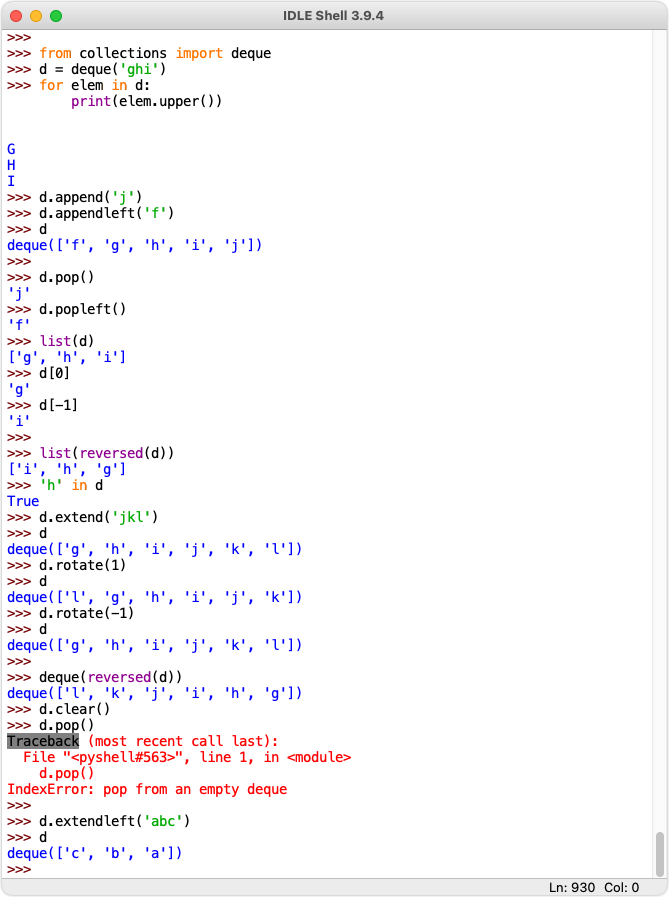
>>> from collections import deque
>>> d = deque('ghi') # make a new deque with three items
>>> for elem in d: # iterate over the deque's elements
...     print(elem.upper())
G
H
I

>>> d.append('j') # add a new entry to the right side
>>> d.appendleft('f') # add a new entry to the left side
>>> d # show the representation of the deque
deque(['f', 'g', 'h', 'i', 'j'])

>>> d.pop() # return and remove the rightmost item
'j'
>>> d.popleft() # return and remove the leftmost item
'f'
>>> list(d) # list the contents of the deque
['g', 'h', 'i']
>>> d[0] # peek at leftmost item
'g'
>>> d[-1] # peek at rightmost item
'i'

>>> list(reversed(d)) # list the contents of a deque in reverse
['i', 'h', 'g']
>>> 'h' in d # search the deque
True
>>> d.extend('jkl') # add multiple elements at once
>>> d
deque(['g', 'h', 'i', 'j', 'k', 'l'])
>>> d.rotate(1) # right rotation
>>> d
deque(['l', 'g', 'h', 'i', 'j', 'k'])
>>> d.rotate(-1) # left rotation
>>> d
deque(['g', 'h', 'i', 'j', 'k', 'l'])

>>> deque(reversed(d)) # make a new deque in reverse order
deque(['l', 'k', 'j', 'i', 'h', 'g'])
>>> d.clear() # empty the deque
>>> d.pop() # cannot pop from an empty deque
Traceback (most recent call last):
  File "<pyshell#6>", line 1, in -toplevel-
    d.pop()
IndexError: pop from an empty deque

>>> d.extendleft('abc') # extendleft() reverses the input order
>>> d
deque(['c', 'b', 'a'])
Source: https://docs.python.org/2/library/collections.html
Section 47.6: collections.ChainMap
ChainMap 是 3.3 版的新功能
在给定多个映射的情况下,返回一个新的 ChainMap 对象。该对象可将多个二进制文件或其他映射组合在一起,创建一个可更新的单一视图。
ChainMap 在管理嵌套上下文和覆盖方面非常有用。在 Python 世界中,Django 模板引擎中的 Context 类的实现就是一个例子。它可用于快速连接多个映射,以便将结果视为一个单独的单元。这通常比创建一个新字典和运行多个 update() 调用要快得多。
只要有一连串的查找值,就有可能使用 ChainMap。用户指定值和默认值字典就是一个例子。另一个例子是网络使用中的 POST 和 GET 参数映射,例如 Django 或 Flask。通过使用 ChainMap,可以返回两个不同字典的组合视图。
映射参数列表的顺序是从最先搜索到最后搜索。查找会连续搜索底层映射,直到找到一个键。相反,写入、更新和删除只对第一个映射进行操作。
import collections

# define two dictionaries with at least some keys overlapping.
dict1 = {'apple': 1, 'banana': 2}
dict2 = {'coconut': 1, 'date': 1, 'apple': 3}

# create two ChainMaps with different ordering of those dicts.
combined_dict = collections.ChainMap(dict1, dict2)
reverse_ordered_dict = collections.ChainMap(dict2, dict1)
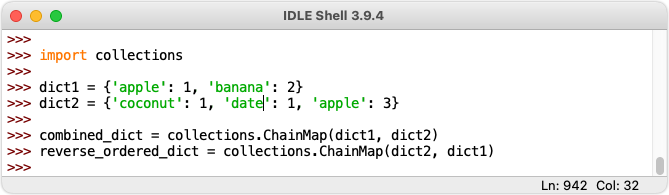
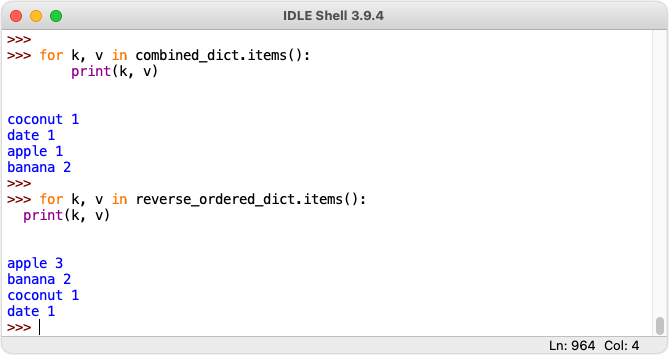
注意顺序对在后续查找中先找到哪个值的影响
>>> for k, v in combined_dict.items():
...    print(k, v)

coconut 1
date 1
apple 1
banana 2

>>> for k, v in reverse_ordered_dict.items():
...    print(k, v)

apple 3
banana 2
coconut 1
date 1