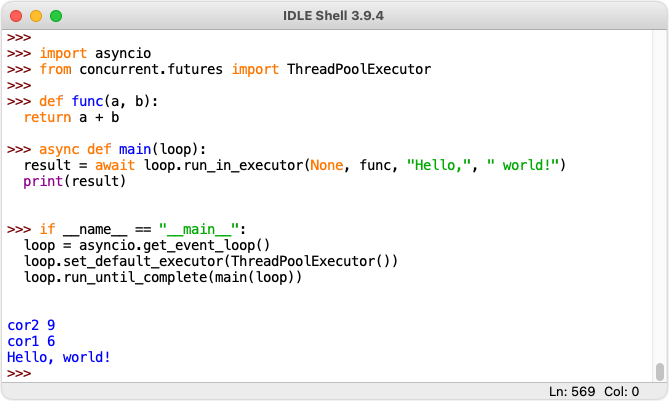
在concurrent.futures中,有两种主要的 Executor 类型:ThreadPoolExecutor 和 ProcessPoolExecutor。ThreadPoolExecutor 包含一个线程池,可以通过构造函数手动设置为特定数量的线程,也可以默认为机器内核数乘以5。ThreadPoolExecutor 使用线程池执行分配给它的任务,通常更擅长 CPU 绑定操作,而不是 I/O 绑定操作。相比之下,ProcessPoolExecutor 会为分配给它的每个任务生成一个新进程。ProcessPoolExecutor 只能接受可剔除的任务和参数。最常见的不可剔除的任务是对象的方法。如果必须在 Executor 中将对象的方法安排为任务,则必须使用 ThreadPoolExecutor。
Section 54.3: UVLoop 的使用
uvloop 是基于 libuv(由 nodejs 使用)的 asyncio.AbstractEventLoop 的实现。它兼容 99% 的 asyncio 功能,速度比传统的 asyncio.EventLoop 快得多。uvloop 目前还未在 Windows 上提供,请使用 pip install uvloop 安装。
import asyncio
import uvloop

if __name__ == "__main__":
  asyncio.set_event_loop(uvloop.new_event_loop())
  # Do your stuff here ...
还可以通过将EventLoopPolicy设置为uvloop中的事件循环工厂来更改事件循环工厂。
import asyncio
import uvloop

if __name__ == "__main__":
  asyncio.set_event_loop_policy(uvloop.EventLoopPolicy())
  loop = asyncio.new_event_loop()
Section 54.4: 同步原语:Event
概念
使用事件来同步调度多个例行程序。
简单地说,事件就像跑步比赛中的发令枪:它让选手们冲出起跑线。
示例
import asyncio
import functools

# 事件触发功能
def trigger(event):
  print('EVENT SET')
  event.set() # 唤醒等待的程序

# 事件消费
async def consumer_a(event):
  consumer_name = 'Consumer A'
  print('{} waiting'.format(consumer_name))
  await event.wait()
  print('{} triggered'.format(consumer_name))

async def consumer_b(event):
  consumer_name = 'Consumer B'
  print('{} waiting'.format(consumer_name))
  await event.wait()
  print('{} triggered'.format(consumer_name))

# event
event = asyncio.Event()

# wrap coroutines in one future
main_future = asyncio.wait([consumer_a(event), consumer_b(event)])

# event loop
event_loop = asyncio.get_event_loop()
event_loop.call_later(0.1, functools.partial(trigger, event)) # trigger event in 0.1 sec

# complete main_future
done, pending = event_loop.run_until_complete(main_future)
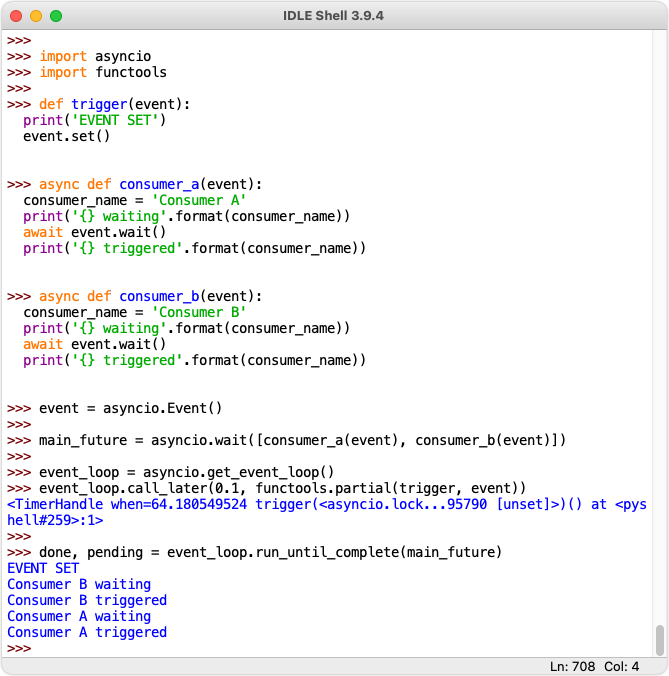
Output:
Consumer B waiting
Consumer A waiting
EVENT SET
Consumer B triggered
Consumer A triggered
Section 54.5: 一个简单的 Websocket
在这里,我们使用 asyncio 制作一个简单的 echo websocket。我们定义了用于连接服务器和发送/接收消息的例行程序。websocket 的通信在一个 main 例程中运行,该例程由一个事件循环运行。本示例修改自 stackoverflow上的一篇文章。
import asyncio
import aiohttp

session = aiohttp.ClientSession() # handles the context manager
class EchoWebsocket:

  async def connect(self):
    self.websocket = await session.ws_connect("wss://echo.websocket.org")

  async def send(self, message):
    self.websocket.send_str(message)

  async def receive(self):
    result = (await self.websocket.receive())
    return result.data

async def main():
  echo = EchoWebsocket()
  await echo.connect()
  await echo.send("Hello World!")
  print(await echo.receive()) # "Hello World!"


if __name__ == '__main__':
  # The main loop
  loop = asyncio.get_event_loop()
  loop.run_until_complete(main())
Section 54.6: 关于 asyncio 的常见误解
关于 asnycio,最常见的误解可能是它可以让你并行运行任何任务--避开 GIL(全局解释器锁),从而并行(在独立线程上)执行阻塞作业!
asyncio(以及为与 asyncio 协作而构建的库)建立在 ”例程"(coroutines)的基础上:这些函数(以协作方式)将控制流交还给调用函数。time.sleep 是一个阻塞函数的例子。程序的执行流程将在此停止,只有在 time.sleep 结束后才会返回。
另一方面,asyncio.aiohttp 在构建时就考虑到了 asyncio。它的例行程序将并发运行。
- 如果你有长期运行的、与 CPU 相关的任务,你希望并行运行
asyncio,那么asyncio并不适合你。为此,你需要threads或multiprocessing。 - 如果运行的是 IO 绑定任务,则可以使用
asyncio并发运行它们。


