发布于 Tkinter 是 Python 最流行的 GUI(图形用户界面)库。本主题将介绍该库的正确用法及其功能。
Section 62.1: Geometry Managers
Tkinter 有三种几何管理机制:place、pack 和 grid。
place 管理器使用绝对像素坐标。
pack 管理器将部件放置在 4 个边中的一个。新 Widget 会放置在现有 Widget 的旁边。
grid 管理器将部件放置到网格中,类似于动态调整大小的电子表格。
place
widget.place 最常用的关键字参数如下:
-
x,部件的绝对x坐标 -
y,部件的绝对y坐标 -
height,部件的绝对高度 -
width,部件的绝对宽度
使用 place 的代码示例:
class PlaceExample(Frame):
  def __init__(self,master):
    Frame.__init__(self,master)
    self.grid()
    top_text=Label(master,text="This is on top at the origin")
    #top_text.pack()
    top_text.place(x=0,y=0,height=50,width=200)
    bottom_right_text=Label(master,text="This is at position 200,400")
    #top_text.pack()
    bottom_right_text.place(x=200,y=400,height=50,width=200)

# Spawn Window
if __name__=="__main__":
  root=Tk()
  place_frame=PlaceExample(root)
  place_frame.mainloop()
Pack
widget.pack 可以接受以下关键字参数:
-
expand,是否填充父代留下的空间 -
fill,是否展开以填充所有空间(NONE(默认)、X、Y或BOTH) -
side,要打包的一面(TOP(默认)、BOTTOM、LEFT或RIGHT)
Grid
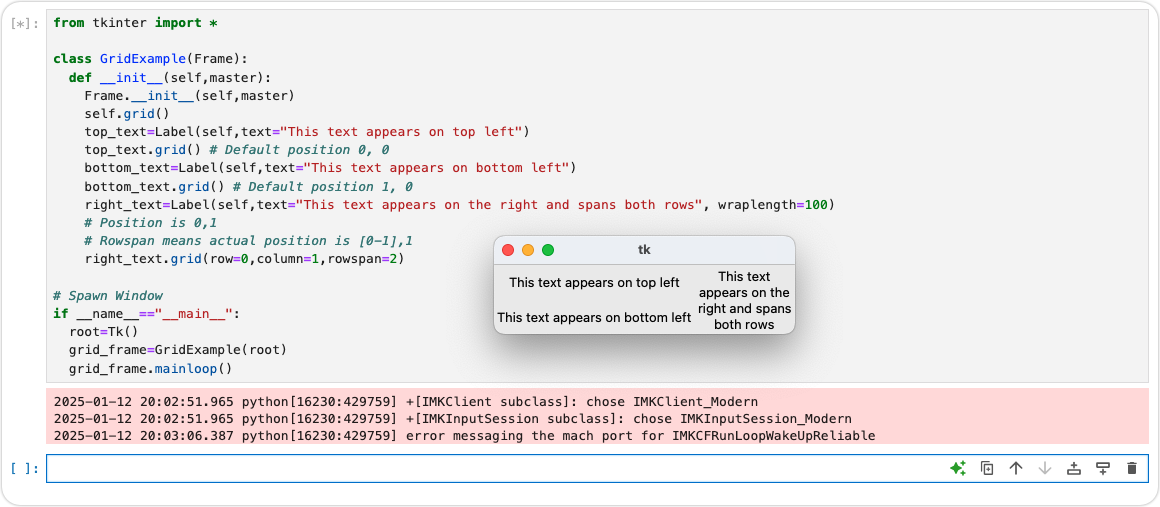
widget.grid "最常用的关键字参数如下:
row,部件的行数(默认为最小的未占用行数)
rowspan,部件横跨的列数(默认为 1)
column,部件的列(默认为 0)
columnspan,窗口小部件横跨的列数(默认为 1)
sticky,如果网格单元大于 widget,将其放置的位置(N,NE,E,SE,S,SW,W,NW 的组合)
行和列的索引为零。行数向下增加,列数向右增加。
使用 grid 的代码示例:
from tkinter import *

class GridExample(Frame):
  def __init__(self,master):
    Frame.__init__(self,master)
    self.grid()
    top_text=Label(self,text="This text appears on top left")
    top_text.grid() # Default position 0, 0
    bottom_text=Label(self,text="This text appears on bottom left")
    bottom_text.grid() # Default position 1, 0
    right_text=Label(self,text="This text appears on the right and spans both rows", wraplength=100)
    # Position is 0,1
    # Rowspan means actual position is [0-1],1
    right_text.grid(row=0,column=1,rowspan=2)

# Spawn Window
if __name__=="__main__":
  root=Tk()
  grid_frame=GridExample(root)
  grid_frame.mainloop()
切勿在同一帧内混合使用包装和网格!这样做会导致应用程序死锁!
Section 62.2: A minimal tkinter Application
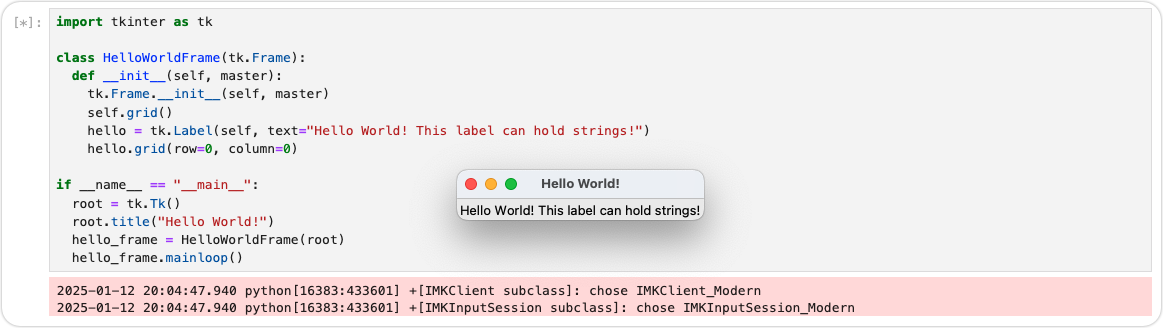
tkinter 是一个图形用户界面工具包,提供了对 Tk/Tcl 图形用户界面库的封装,并包含在 Python 中。下面的代码使用 tkinter 创建了一个新窗口,并在窗口主体中放置了一些文本。
注意:在 Python 2 中,大小写可能略有不同,请参见下面的备注部分。
import tkinter as tk

# GUI window is a subclass of the basic tkinter Frame object
class HelloWorldFrame(tk.Frame):
  def __init__(self, master):
    # Call superclass constructor
    tk.Frame.__init__(self, master)
    # Place frame into main window
    self.grid()
    # Create text box with "Hello World" text
    hello = tk.Label(self, text="Hello World! This label can hold strings!")
    # Place text box into frame
    hello.grid(row=0, column=0)

# Spawn window
if __name__ == "__main__":
  # Create main window object
  root = tk.Tk()
  # Set title of window
  root.title("Hello World!")
  # Instantiate HelloWorldFrame object
  hello_frame = HelloWorldFrame(root)
  # Start GUI
  hello_frame.mainloop()