本章介绍了如何使用Python的gzip模块来处理GZip格式的压缩文件。gzip模块提供了一个简单的接口,用于压缩和解压缩文件,类似于GNU程序gzip和gunzip的功能。数据压缩由zlib模块提供。
gzip模块提供了GzipFile类,该类模仿了Python的文件对象。GzipFile类可以读取和写入GZip格式的文件,自动压缩或解压缩数据,使其看起来像一个普通的文件对象。
Section 133.1: 读取和写入GNU zip文件
import gzip
import os

# 定义输出文件名
outfilename = 'example.txt.gz'

# 打开文件以写入二进制模式
output = gzip.open(outfilename, 'wb')
try:
    # 写入内容
    output.write(b'Contents of the example file go here.\n')  # 注意:写入的内容必须是字节类型
finally:
    # 关闭文件
    output.close()

# 打印文件信息
print(outfilename, 'contains', os.stat(outfilename).st_size, 'bytes of compressed data')

# 使用系统命令检查文件类型
os.system('file -b --mime %s' % outfilename)
将上述代码保存为gzip_write.py,并通过终端运行它。
$ python gzip_write.py

application/x-gzip; charset=binary
example.txt.gz contains 68 bytes of compressed data
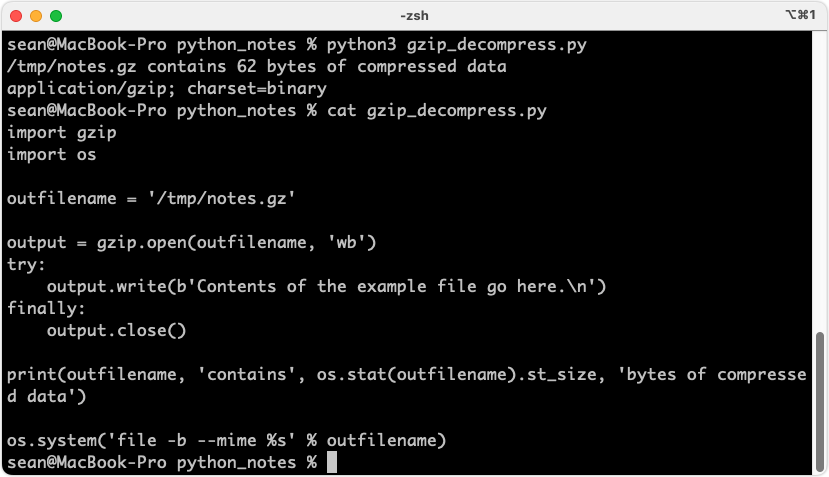
代码说明
- 写入GZip文件:
- 使用
gzip.open()打开文件,指定文件名和模式(wb表示以二进制写入模式打开)。 - 写入内容时,必须确保内容是字节类型(例如使用
b'...')。 - 使用
try...finally确保文件在操作完成后正确关闭。
- 使用
- 文件信息:
- 使用
os.stat()获取文件的大小(st_size属性)。 - 使用
os.system()调用系统命令file来检查文件的MIME类型。
- 使用
输出解释
application/x-gzip; charset=binary:表示文件是一个GZip压缩文件。example.txt.gz contains 68 bytes of compressed data:表示压缩后的文件大小为68字节。
注意事项
- 写入GZip文件时,内容必须是字节类型。如果需要写入字符串,可以使用
str.encode()方法将其转换为字节类型,例如:
output.write('Contents of the example file go here.\n'.encode('utf-8'))
- 在读取GZip文件时,同样需要以二进制模式打开文件,并在需要时将内容解码为字符串。


