线程允许 Python 程序同时处理多个函数,而不是依次运行一系列命令。本章将介绍线程背后的原理,并展示其使用方法。
Section 117.1: 多线程基础
通过使用 threading 模块,可以通过创建一个新的 threading.Thread 并为其分配一个函数来启动一个新的执行线程:
import threading

def foo():
    print("Hello threading!")

my_thread = threading.Thread(target=foo)
target 参数引用了要运行的函数(或可调用对象)。线程不会在调用 start 方法之前开始执行。
启动线程
my_thread.start() # 打印 'Hello threading!'
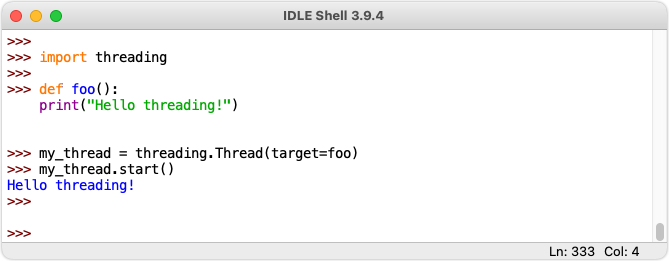
现在,my_thread 已经运行并终止了,再次调用 start 将会引发一个 RuntimeError。如果你希望将线程作为守护线程运行,可以在调用 start() 之前,通过传递 daemon=True 参数,或者将 my_thread.daemon 设置为 True,使线程在后台静默运行。
线程同步(Joining a Thread)
在某些情况下,你将一个大任务拆分成多个小任务,并希望并发运行,但需要等待所有任务完成后再继续,此时可以使用 Thread.join() 方法。
例如,假设你希望下载一个网站的多个页面并将它们编译成一个页面。你可以这样做:
import requests
from threading import Thread
from queue import Queue

q = Queue(maxsize=20)
def put_page_to_q(page_num):
  q.put(requests.get('http://some-website.com/page_%s.html' % page_num))

def compile(q):
  # 需要所有页面才能执行的神奇函数
  if not q.full():
    raise ValueError
  else:
    print("Done compiling!")

threads = []
for page_num in range(20):
  t = Thread(target=requests.get, args=(page_num,))
  t.start()
  threads.append(t)

# 接下来,通过 join() 确保所有线程运行完成后再继续。
# join() 是一个阻塞调用(除非在调用 join 时使用 blocking=False 参数)
for t in threads:
  t.join()

# 现在所有线程已完成,调用 compile()
compile(q)
关于 join() 的工作原理,可以参考这里。
创建自定义线程类
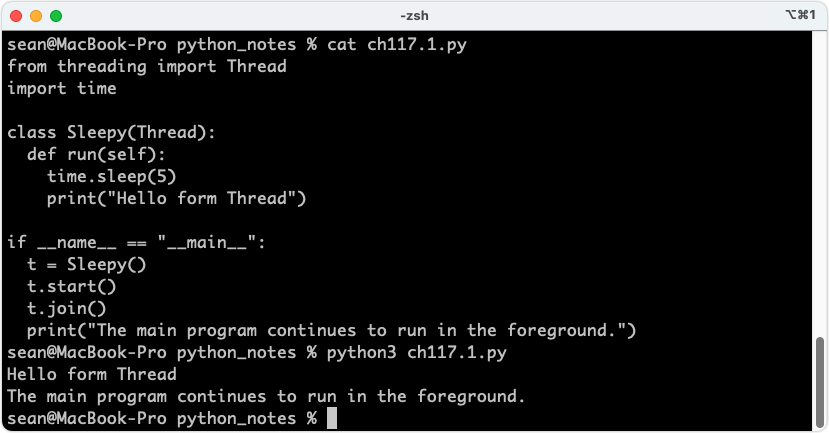
使用 threading.Thread 类,我们可以创建一个新的自定义线程类。必须在子类中覆盖 run 方法。
from threading import Thread
import time

class Sleepy(Thread):
  def run(self):
    time.sleep(5)
    print("Hello form Thread")

if __name__ == "__main__":
  t = Sleepy()
  t.start() # start 方法会自动调用 Thread 类的 run 方法
  # print('The main program continues to run in foreground.')
  t.join()
  print("The main program continues to run in the foreground.")
Section 117.2: 线程间通信
你的代码中有多个线程,你需要在它们之间安全地通信。
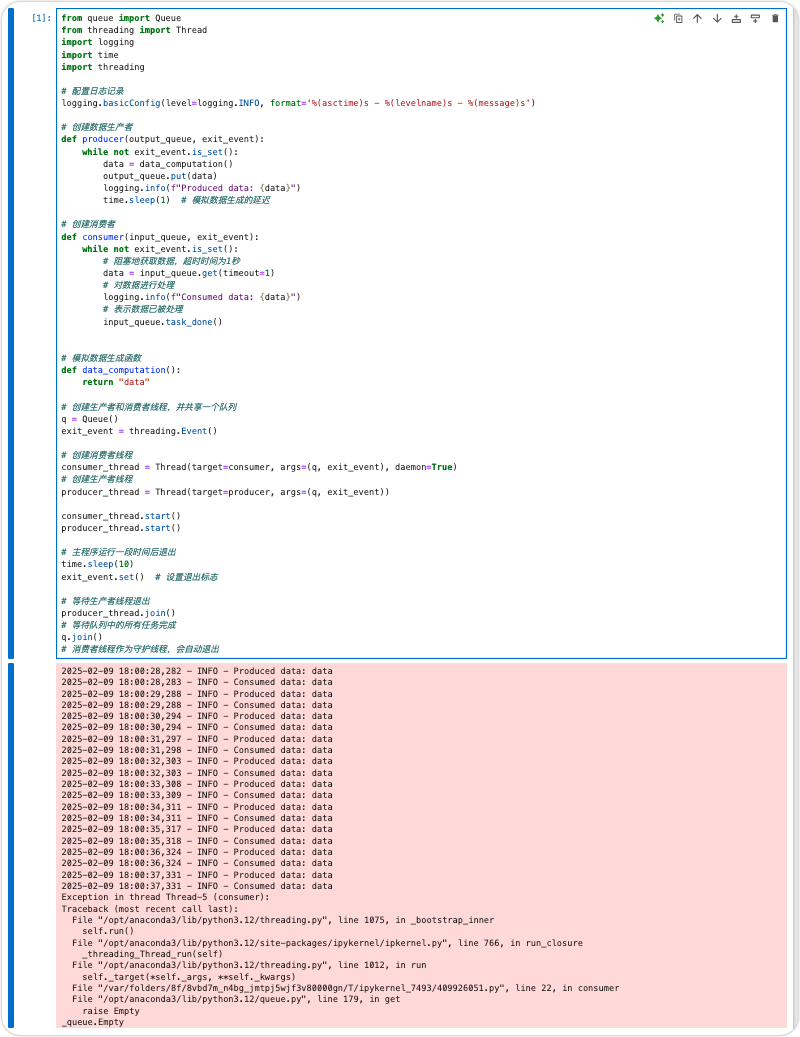
可以使用 queue 模块中的 Queue。
from queue import Queue
from threading import Thread
import logging
import time

# 配置日志记录
logging.basicConfig(level=logging.INFO, format='%(asctime)s - %(levelname)s - %(message)s')

# 创建数据生产者
def producer(output_queue, exit_event):
    while not exit_event.is_set():
        data = data_computation()
        output_queue.put(data)
        logging.info(f"Produced data: {data}")
        time.sleep(1)  # 模拟数据生成的延迟

# 创建消费者
def consumer(input_queue, exit_event):
    while not exit_event.is_set():
        try:
            # 阻塞地获取数据,超时时间为1秒
            data = input_queue.get(timeout=1)
            # 对数据进行处理
            logging.info(f"Consumed data: {data}")
            # 表示数据已被处理
            input_queue.task_done()
        except Queue.Empty:
            logging.info("No data in queue, waiting for more data.")

# 模拟数据生成函数
def data_computation():
    return "data"

# 创建生产者和消费者线程,并共享一个队列
q = Queue()
exit_event = threading.Event()

# 创建消费者线程
consumer_thread = Thread(target=consumer, args=(q, exit_event), daemon=True)
# 创建生产者线程
producer_thread = Thread(target=producer, args=(q, exit_event))

consumer_thread.start()
producer_thread.start()

# 主程序运行一段时间后退出
time.sleep(10)
exit_event.set()  # 设置退出标志

# 等待生产者线程退出
producer_thread.join()
# 等待队列中的所有任务完成
q.join()
# 消费者线程作为守护线程,会自动退出
Section 117.3: 创建线程池
使用 threading 和 queue:
from socket import socket, AF_INET, SOCK_STREAM
from threading import Thread
from queue import Queue

def echo_server(addr, nworkers):
  print('Echo server running at', addr)
  # 启动客户端工作线程
  q = Queue()
  for n in range(nworkers):
    t = Thread(target=echo_client, args=(q,))
    t.daemon = True
    t.start()

  # 运行服务器
  sock = socket(AF_INET, SOCK_STREAM)
  sock.bind(addr)
  sock.listen(5)
  while True:
    client_sock, client_addr = sock.accept()
    q.put((client_sock, client_addr))

echo_server(('',15000), 128)
使用 concurrent.futures.ThreadPoolExecutor:
from socket import AF_INET, SOCK_STREAM, socket
from concurrent.futures import ThreadPoolExecutor

def echo_server(addr):
  print('Echo server running at', addr)
  pool = ThreadPoolExecutor(128)
  sock = socket(AF_INET, SOCK_STREAM)
  sock.bind(addr)
  sock.listen(5)
  while True:
    client_sock, client_addr = sock.accept()
    pool.submit(echo_client, client_sock, client_addr)

echo_server(('',15000))
出自《Python Cookbook》(第 3 版),作者 David Beazley 和 Brian K. Jones(O'Reilly)。版权所有者:David Beazley 和 Brian Jones,ISBN 978-1-449-34037-7。
Section 117.4: 多线程的高级用法
本节将包含一些使用多线程实现的高级示例。
高级打印机(日志记录器)
一个线程,它会打印接收到的所有内容,并根据终端宽度修改输出。有趣的是,当终端宽度发生变化时,已经打印的输出也会被修改。
import threading
import Queue
import time
import sys
import subprocess
from backports.shutil_get_terminal_size import get_terminal_size

printq = Queue.Queue()
interrupt = False
lines = []

def main():
  ptt = threading.Thread(target=printer) # 打开打印机
  ptt.daemon = True
  ptt.start()

  # 一些要打印的示例内容
  for i in xrange(1,100):
    printq.put(' '.join([str(x) for x in range(1,i)])) # 向打印机发送内容的实际方式
    time.sleep(.5)

def split_line(line, cols):
  if len(line) > cols:
    new_line = ''
    ww = line.split()
    i = 0
    while len(new_line) <= (cols - len(ww[i]) - 1):
      new_line += ww[i] + ' '
      i += 1
      print len(new_line)
    if new_line == '':
      return (line, '')
    return (new_line, ' '.join(ww[i:]))
  else:
    return (line, '')

def printer():

  while True:
    cols, rows = get_terminal_size() # 获取终端尺寸
    msg = '#' + '-' * (cols - 2) + '#\n' # 创建
    try:
      new_line = str(printq.get_nowait())
      if new_line != '!@#EXIT#@!': # 优雅关闭打印机线程的好方法
        lines.append(new_line)
        printq.task_done()
      else:
        printq.task_done()
        sys.exit()
    except Queue.Empty:
      pass

    # 构建要显示的新消息,并拆分过长的行
    for line in lines:
      res = line # 下面是为了拆分行,如果行长于 cols

      # 拆分行
      while len(res) !=0:
        toprint, res = split_line(res, cols)
        msg += '\n' + toprint

    # 清空终端并打印新输出
    subprocess.check_call('clear') # 保持终端干净
    sys.stdout.write(msg)
    sys.stdout.flush()
    time.sleep(.5)
Section 117.5: 使用 while 循环的可停止线程
import threading
import time

class StoppableThread(threading.Thread):
  """带有 stop() 方法的线程类。线程本身需要定期检查 stopped() 条件。"""

  def __init__(self):
    super(StoppableThread, self).__init__()
    self._stop_event = threading.Event()

  def stop(self):
    self._stop_event.set()

  def join(self, *args, **kwargs):
    self.stop()
    super(StoppableThread,self).join(*args, **kwargs)

  def run():
    while not self._stop_event.is_set():
      print("Still running!")
      time.sleep(2)
    print("stopped!")
基于[这个问题](https://stackoverflow.com/questions/323972/is-there-any-way-to-kill-a


