一般情况下通过系统仓库安装或者系统默认已经安装的sqlite3数据库的版本都不是最新版本,版本大致偏旧。有时候一些项目的安全或者其他组建依赖的缘故,需要升级到较新的版本。
查看系统中sqlite3的版本:
在针对sqlite3的升级前,先确认当前安装的版本是否符合项目的需求等。如果确定不符合再进行升级。使用sqlite3 --version命令进行版本的查看。如果提示“未找到命令”,则该系统中未安装sqlite3。
[root@almalinux ~]# sqlite3 --version
3.34.1 2021-01-20 14:10:07 10e20c0b43500cfb9bbc0eaa061c57514f715d87238f4d835880cd846b9ealt1
虽然sqlite3的数据库一般都是以文件的形式保存在项目的目录中,但是升级是有风险的操作,升级前做好对应数据的保存工作!
下载最新版本的 SQLite3:
访问 SQLite 官方网站下载最新版本的源代码:SQLite Download Page。
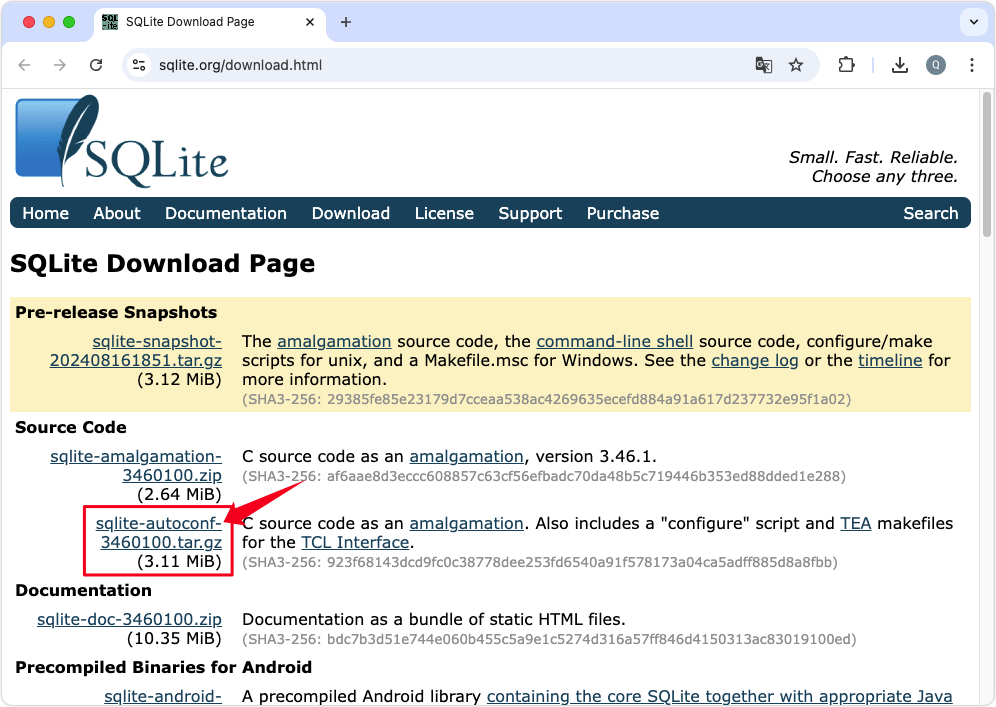 下载
sqlite-autoconf-3460100.tar.gz这个包含了配置脚本的压缩包
[root@almalinux ~]# wget -c https://www.sqlite.org/2024/sqlite-autoconf-3460100.tar.gz
--2024-09-18 14:54:36--  https://www.sqlite.org/2024/sqlite-autoconf-3460100.tar.gz
正在解析主机 www.sqlite.org (www.sqlite.org)... 45.33.6.223, 2600:3c00::f03c:91ff:fe96:b959
正在连接 www.sqlite.org (www.sqlite.org)|45.33.6.223|:443... 已连接。
已发出 HTTP 请求,正在等待回应... 200 OK
长度:3265571 (3.1M) [application/x-gzip]
正在保存至: “sqlite-autoconf-3460100.tar.gz”

sqlite-autoconf-3460100.tar.gz 100%[====================================================>]   3.11M  9.42KB/s  用时 22m 44s

2024-09-18 15:17:23 (2.34 KB/s) - 已保存 “sqlite-autoconf-3460100.tar.gz” [3265571/3265571])
解压源代码:
下载完成后,使用 tar 命令解压下载的源代码包。
[root@almalinux ~]# tar zxvf sqlite-autoconf-3460100.tar.gz
sqlite-autoconf-3460100/
sqlite-autoconf-3460100/compile
sqlite-autoconf-3460100/sqlite3.c
sqlite-autoconf-3460100/sqlite3.rc
sqlite-autoconf-3460100/Makefile.msc
sqlite-autoconf-3460100/sqlite3.1
sqlite-autoconf-3460100/Makefile.in
sqlite-autoconf-3460100/install-sh
sqlite-autoconf-3460100/aclocal.m4
sqlite-autoconf-3460100/config.sub
sqlite-autoconf-3460100/Makefile.fallback
sqlite-autoconf-3460100/shell.c
sqlite-autoconf-3460100/depcomp
sqlite-autoconf-3460100/sqlite3.h
sqlite-autoconf-3460100/Makefile.am
sqlite-autoconf-3460100/missing
sqlite-autoconf-3460100/README.txt
sqlite-autoconf-3460100/ltmain.sh
sqlite-autoconf-3460100/tea/
sqlite-autoconf-3460100/tea/tclconfig/
sqlite-autoconf-3460100/tea/tclconfig/tcl.m4
sqlite-autoconf-3460100/tea/tclconfig/install-sh
sqlite-autoconf-3460100/tea/Makefile.in
sqlite-autoconf-3460100/tea/aclocal.m4
sqlite-autoconf-3460100/tea/win/
sqlite-autoconf-3460100/tea/win/makefile.vc
sqlite-autoconf-3460100/tea/win/nmakehlp.c
sqlite-autoconf-3460100/tea/win/rules.vc
sqlite-autoconf-3460100/tea/configure.ac
sqlite-autoconf-3460100/tea/doc/
sqlite-autoconf-3460100/tea/doc/sqlite3.n
sqlite-autoconf-3460100/tea/pkgIndex.tcl.in
sqlite-autoconf-3460100/tea/README
sqlite-autoconf-3460100/tea/configure
sqlite-autoconf-3460100/tea/license.terms
sqlite-autoconf-3460100/tea/generic/
sqlite-autoconf-3460100/tea/generic/tclsqlite3.c
sqlite-autoconf-3460100/config.guess
sqlite-autoconf-3460100/configure.ac
sqlite-autoconf-3460100/INSTALL
sqlite-autoconf-3460100/sqlite3ext.h
sqlite-autoconf-3460100/configure
sqlite-autoconf-3460100/Replace.cs
sqlite-autoconf-3460100/sqlite3rc.h
sqlite-autoconf-3460100/sqlite3.pc.in
编译和安装:
进入解压后的目录,使用 ./configure 命令配置编译选项,然后使用 make 和 make install 命令编译和安装 SQLite3。
[root@almalinux ~]# cd sqlite-autoconf-3460100
[root@almalinux sqlite-autoconf-3460100]# ./configure
checking for a BSD-compatible install... /usr/bin/install -c
checking whether build environment is sane... yes
checking for a race-free mkdir -p... /usr/bin/mkdir -p
checking for gawk... gawk
checking whether make sets $(MAKE)... yes
checking whether make supports nested variables... yes
checking whether make supports the include directive... yes (GNU style)
checking for gcc... gcc
checking whether the C compiler works... yes
checking for C compiler default output file name... a.out
checking for suffix of executables...
checking whether we are cross compiling... no
checking for suffix of object files... o
checking whether the compiler supports GNU C... yes
checking whether gcc accepts -g... yes
checking for gcc option to enable C11 features... none needed
checking whether gcc understands -c and -o together... yes
checking dependency style of gcc... gcc3
checking for special C compiler options needed for large files... no
checking for _FILE_OFFSET_BITS value needed for large files... no
checking for gcc... (cached) gcc
checking whether the compiler supports GNU C... (cached) yes
checking whether gcc accepts -g... (cached) yes
checking for gcc option to enable C11 features... (cached) none needed
checking whether gcc understands -c and -o together... (cached) yes
checking dependency style of gcc... (cached) gcc3
checking build system type... x86_64-pc-linux-gnu
checking host system type... x86_64-pc-linux-gnu
checking how to print strings... printf
checking for a sed that does not truncate output... /usr/bin/sed
checking for grep that handles long lines and -e... /usr/bin/grep
checking for egrep... /usr/bin/grep -E
checking for fgrep... /usr/bin/grep -F
checking for ld used by gcc... /usr/bin/ld
checking if the linker (/usr/bin/ld) is GNU ld... yes
checking for BSD- or MS-compatible name lister (nm)... /usr/bin/nm -B
checking the name lister (/usr/bin/nm -B) interface... BSD nm
checking whether ln -s works... yes
checking the maximum length of command line arguments... 1572864
checking how to convert x86_64-pc-linux-gnu file names to x86_64-pc-linux-gnu format... func_convert_file_noop
checking how to convert x86_64-pc-linux-gnu file names to toolchain format... func_convert_file_noop
checking for /usr/bin/ld option to reload object files... -r
checking for objdump... objdump
checking how to recognize dependent libraries... pass_all
checking for dlltool... no
checking how to associate runtime and link libraries... printf %s\n
checking for ar... ar
checking for archiver @FILE support... @
checking for strip... strip
checking for ranlib... ranlib
checking command to parse /usr/bin/nm -B output from gcc object... ok
checking for sysroot... no
checking for a working dd... /usr/bin/dd
checking how to truncate binary pipes... /usr/bin/dd bs=4096 count=1
checking for mt... no
checking if : is a manifest tool... no
checking for stdio.h... yes
checking for stdlib.h... yes
checking for string.h... yes
checking for inttypes.h... yes
checking for stdint.h... yes
checking for strings.h... yes
checking for sys/stat.h... yes
checking for sys/types.h... yes
checking for unistd.h... yes
checking for dlfcn.h... yes
checking for objdir... .libs
checking if gcc supports -fno-rtti -fno-exceptions... no
checking for gcc option to produce PIC... -fPIC -DPIC
checking if gcc PIC flag -fPIC -DPIC works... yes
checking if gcc static flag -static works... no
checking if gcc supports -c -o file.o... yes
checking if gcc supports -c -o file.o... (cached) yes
checking whether the gcc linker (/usr/bin/ld -m elf_x86_64) supports shared libraries... yes
checking whether -lc should be explicitly linked in... no
checking dynamic linker characteristics... GNU/Linux ld.so
checking how to hardcode library paths into programs... immediate
checking whether stripping libraries is possible... yes
checking if libtool supports shared libraries... yes
checking whether to build shared libraries... yes
checking whether to build static libraries... yes
checking for fdatasync... yes
checking for usleep... yes
checking for fullfsync... no
checking for localtime_r... yes
checking for gmtime_r... yes
checking for gcc options needed to detect all undeclared functions... none needed
checking whether strerror_r is declared... yes
checking whether strerror_r returns char *... no
checking for editline/readline.h... no
checking for readline/readline.h... no
checking for library containing pthread_create... none required
checking for library containing pthread_mutexattr_init... none required
checking for library containing dlopen... none required
checking for whether to support dynamic extensions... yes
checking SQL math functions... enabled
checking for library containing ceil... -lm
checking FTS4 extension... enabled
checking FTS3 extension... disabled
checking FTS5 extension... enabled
checking for library containing log... none required
checking RTREE extension... enabled
checking Session extension... disabled
checking Build type... release
checking for posix_fallocate... yes
checking for zlib.h... no
checking for library containing system... none required
checking that generated files are newer than configure... done
configure: creating ./config.status
config.status: creating Makefile
config.status: creating sqlite3.pc
config.status: executing depfiles commands
config.status: executing libtool commands
配置编译正常通过应该是中间没有报错的,配置完成后就可以使用make和make install这两个命令进行源码的编译和安装了。因为过程的输出太多,这里就不zhan贴上来。
替换旧版本的 SQLite3:
因为系统中已存在旧版本的 SQLite3,需要手动替换。你可以使用 mv 命令将旧版本的 sqlite3 移动到一个备份位置,然后使用 ln -s 创建新版本 sqlite3 的符号链接到 /usr/bin/sqlite3。
[root@almalinux sqlite-autoconf-3460100]# mv /usr/bin/sqlite3 /home/sqlite3_backup
[root@almalinux sqlite-autoconf-3460100]# ln -s /usr/local/bin/sqlite3 /usr/bin/sqlite3
更新动态链接库:
如果你的系统使用动态链接库,可能需要更新库路径。例如,你可以使用 echo "/usr/local/lib" > /etc/ld.so.conf.d/sqlite3.conf 命令添加新的库路径,并使用 ldconfig 命令更新缓存。
[root@almalinux sqlite-autoconf-3460100]# echo "/usr/local/lib" > /etc/ld.so.conf.d/sqlite3.conf
[root@almalinux sqlite-autoconf-3460100]# ldconfig
验证新版本:
使用 sqlite3 --version 命令检查新安装的 SQLite3 版本。
[root@almalinux sqlite-autoconf-3460100]# sqlite3 --version
3.46.1 2024-08-13 09:16:08 c9c2ab54ba1f5f46360f1b4f35d849cd3f080e6fc2b6c60e91b16c63f69a1e33 (64-bit)
请注意,这些步骤可能会根据你的操作系统和环境有所不同。如果你在升级过程中遇到任何问题,可以参考相关的教程或社区论坛获取帮助。


