MySQL处理可以使用MySQL Workbench、navicat、DBeaver等客户端连接外,在工作中最常用的使用方式还是命令行窗口。
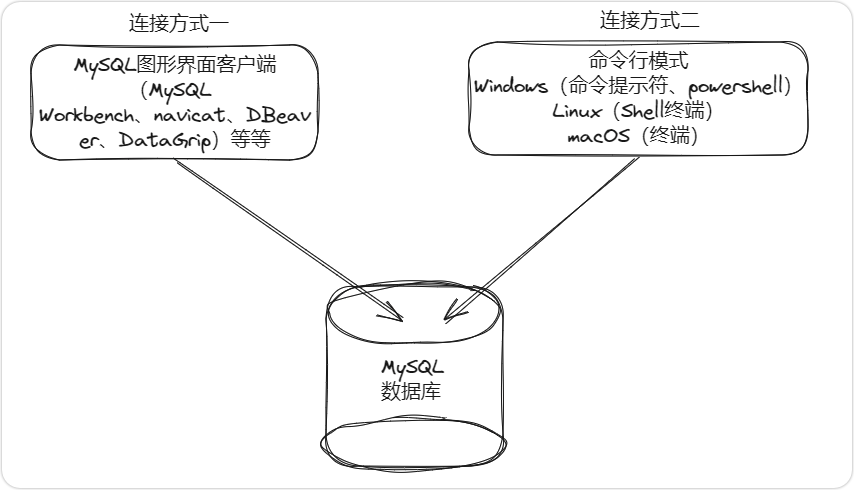
对于Windows操作系统,使用cmd打开【命令提示符】窗口或者【Windows PowerShell】窗口;对于Linux或者macOS操作系统,可以打开【终端】窗口,并在窗口中输入下面的命令:
mysql -h localhost -u root -p
Enter password:
mysql是MySQL数据库提供的命令,用于连接MySQL数据库。 -h、-u以及-p分别为mysql命令需要的参数,-h后面填主机名,例如127.0.0.1或者localhost(这两者皆代表本机);-u 后面跟着用户名,例如root;-p后面可以填写密码,但是建议不要直接填写密码在-p后面,以防止密码泄露(如果直接写在-p后面,通过history命令可以直接看到明文的密码),可以在按回车键后的提示 Enter password: 后面填写用户对应的密码。
上面的命令执行完成后,可以看到下面的信息:
[root@databases ~]# mysql -h localhost -uroot -p
Enter password:
Welcome to the MySQL monitor.  Commands end with ; or \g.
Your MySQL connection id is 5
Server version: 5.7.42 MySQL Community Server (GPL)

Copyright (c) 2000, 2023, Oracle and/or its affiliates.

Oracle is a registered trademark of Oracle Corporation and/or its
affiliates. Other names may be trademarks of their respective
owners.

Type 'help;' or '\h' for help. Type '\c' to clear the current input statement.

mysql>
mysql>提示符:表示通过命令行的方式成功连接到了MySQL数据库,也告诉我们MySQL数据库已经准备好让我们输入SQL语句。
如果还想要深入的进一步了解mysql命令的使用,可以执行mysql --help,该命令会详细介绍mysql命令每个参数的作用,具体内容如下:
[root@databases ~]# mysql --help
mysql  Ver 14.14 Distrib 5.7.42, for linux-glibc2.12 (x86_64) using  EditLine wrapper
Copyright (c) 2000, 2023, Oracle and/or its affiliates.

Oracle is a registered trademark of Oracle Corporation and/or its
affiliates. Other names may be trademarks of their respective
owners.

Usage: mysql [OPTIONS] [database]
  -?, --help          Display this help and exit.
  -I, --help          Synonym for -?
  --auto-rehash       Enable automatic rehashing. One doesn't need to use
                      'rehash' to get table and field completion, but startup
                      and reconnecting may take a longer time. Disable with
                      --disable-auto-rehash.
                      (Defaults to on; use --skip-auto-rehash to disable.)
  -A, --no-auto-rehash
                      No automatic rehashing. One has to use 'rehash' to get
                      table and field completion. This gives a quicker start of
                      mysql and disables rehashing on reconnect.
  --auto-vertical-output
                      Automatically switch to vertical output mode if the
                      result is wider than the terminal width.
  -B, --batch         Don't use history file. Disable interactive behavior.
                      (Enables --silent.)
  --bind-address=name IP address to bind to.
  --binary-as-hex     Print binary data as hex
  --character-sets-dir=name
                      Directory for character set files.
  --column-type-info  Display column type information.
  -c, --comments      Preserve comments. Send comments to the server. The
                      default is --skip-comments (discard comments), enable
                      with --comments.
  -C, --compress      Use compression in server/client protocol.
  -#, --debug[=#]     This is a non-debug version. Catch this and exit.
  --debug-check       This is a non-debug version. Catch this and exit.
  -T, --debug-info    This is a non-debug version. Catch this and exit.
  -D, --database=name Database to use.
  --default-character-set=name
                      Set the default character set.
  --delimiter=name    Delimiter to be used.
  --enable-cleartext-plugin
                      Enable/disable the clear text authentication plugin.
  -e, --execute=name  Execute command and quit. (Disables --force and history
                      file.)
  -E, --vertical      Print the output of a query (rows) vertically.
  -f, --force         Continue even if we get an SQL error.
  --histignore=name   A colon-separated list of patterns to keep statements
                      from getting logged into syslog and mysql history.
  -G, --named-commands
                      Enable named commands. Named commands mean this program's
                      internal commands; see mysql> help . When enabled, the
                      named commands can be used from any line of the query,
                      otherwise only from the first line, before an enter.
                      Disable with --disable-named-commands. This option is
                      disabled by default.
  -i, --ignore-spaces Ignore space after function names.
  --init-command=name SQL Command to execute when connecting to MySQL server.
                      Will automatically be re-executed when reconnecting.
  --local-infile      Enable/disable LOAD DATA LOCAL INFILE.
  -b, --no-beep       Turn off beep on error.
  -h, --host=name     Connect to host.
  -H, --html          Produce HTML output.
  -X, --xml           Produce XML output.
  --line-numbers      Write line numbers for errors.
                      (Defaults to on; use --skip-line-numbers to disable.)
  -L, --skip-line-numbers
                      Don't write line number for errors.
  -n, --unbuffered    Flush buffer after each query.
  --column-names      Write column names in results.
                      (Defaults to on; use --skip-column-names to disable.)
  -N, --skip-column-names
                      Don't write column names in results.
  --sigint-ignore     Ignore SIGINT (CTRL-C).
  -o, --one-database  Ignore statements except those that occur while the
                      default database is the one named at the command line.
  --pager[=name]      Pager to use to display results. If you don't supply an
                      option, the default pager is taken from your ENV variable
                      PAGER. Valid pagers are less, more, cat [> filename],
                      etc. See interactive help (\h) also. This option does not
                      work in batch mode. Disable with --disable-pager. This
                      option is disabled by default.
  -p, --password[=name]
                      Password to use when connecting to server. If password is
                      not given it's asked from the tty.
  -P, --port=#        Port number to use for connection or 0 for default to, in
                      order of preference, my.cnf, $MYSQL_TCP_PORT,
                      /etc/services, built-in default (3306).
  --prompt=name       Set the mysql prompt to this value.
  --protocol=name     The protocol to use for connection (tcp, socket, pipe,
                      memory).
  -q, --quick         Don't cache result, print it row by row. This may slow
                      down the server if the output is suspended. Doesn't use
                      history file.
  -r, --raw           Write fields without conversion. Used with --batch.
  --reconnect         Reconnect if the connection is lost. Disable with
                      --disable-reconnect. This option is enabled by default.
                      (Defaults to on; use --skip-reconnect to disable.)
  -s, --silent        Be more silent. Print results with a tab as separator,
                      each row on new line.
  -S, --socket=name   The socket file to use for connection.
  --ssl-mode=name     SSL connection mode.
  --ssl               Deprecated. Use --ssl-mode instead.
                      (Defaults to on; use --skip-ssl to disable.)
  --ssl-verify-server-cert
                      Deprecated. Use --ssl-mode=VERIFY_IDENTITY instead.
  --ssl-ca=name       CA file in PEM format.
  --ssl-capath=name   CA directory.
  --ssl-cert=name     X509 cert in PEM format.
  --ssl-cipher=name   SSL cipher to use.
  --ssl-key=name      X509 key in PEM format.
  --ssl-crl=name      Certificate revocation list.
  --ssl-crlpath=name  Certificate revocation list path.
  --tls-version=name  TLS version to use, permitted values are: TLSv1, TLSv1.1,
                      TLSv1.2
  --server-public-key-path=name
                      File path to the server public RSA key in PEM format.
  --get-server-public-key
                      Get server public key
  -t, --table         Output in table format.
  --tee=name          Append everything into outfile. See interactive help (\h)
                      also. Does not work in batch mode. Disable with
                      --disable-tee. This option is disabled by default.
  -u, --user=name     User for login if not current user.
  -U, --safe-updates  Only allow UPDATE and DELETE that uses keys.
  -U, --i-am-a-dummy  Synonym for option --safe-updates, -U.
  -v, --verbose       Write more. (-v -v -v gives the table output format).
  -V, --version       Output version information and exit.
  -w, --wait          Wait and retry if connection is down.
  --connect-timeout=# Number of seconds before connection timeout.
  --max-allowed-packet=#
                      The maximum packet length to send to or receive from
                      server.
  --net-buffer-length=#
                      The buffer size for TCP/IP and socket communication.
  --select-limit=#    Automatic limit for SELECT when using --safe-updates.
  --max-join-size=#   Automatic limit for rows in a join when using
                      --safe-updates.
  --secure-auth       Refuse client connecting to server if it uses old
                      (pre-4.1.1) protocol. Deprecated. Always TRUE
  --server-arg=name   Send embedded server this as a parameter.
  --show-warnings     Show warnings after every statement.
  -j, --syslog        Log filtered interactive commands to syslog. Filtering of
                      commands depends on the patterns supplied via histignore
                      option besides the default patterns.
  --plugin-dir=name   Directory for client-side plugins.
  --default-auth=name Default authentication client-side plugin to use.
  --binary-mode       By default, ASCII '\0' is disallowed and '\r\n' is
                      translated to '\n'. This switch turns off both features,
                      and also turns off parsing of all clientcommands except
                      \C and DELIMITER, in non-interactive mode (for input
                      piped to mysql or loaded using the 'source' command).
                      This is necessary when processing output from mysqlbinlog
                      that may contain blobs.
  --connect-expired-password
                      Notify the server that this client is prepared to handle
                      expired password sandbox mode.

Default options are read from the following files in the given order:
/etc/my.cnf /etc/mysql/my.cnf /usr/local/mysql/etc/my.cnf ~/.my.cnf
The following groups are read: mysql client
The following options may be given as the first argument:
--print-defaults        Print the program argument list and exit.
--no-defaults           Don't read default options from any option file,
                        except for login file.
--defaults-file=#       Only read default options from the given file #.
--defaults-extra-file=# Read this file after the global files are read.
--defaults-group-suffix=#
                        Also read groups with concat(group, suffix)
--login-path=#          Read this path from the login file.

Variables (--variable-name=value)
and boolean options {FALSE|TRUE}  Value (after reading options)
--------------------------------- ----------------------------------------
auto-rehash                       TRUE
auto-vertical-output              FALSE
bind-address                      (No default value)
binary-as-hex                     FALSE
character-sets-dir                (No default value)
column-type-info                  FALSE
comments                          FALSE
compress                          FALSE
database                          (No default value)
default-character-set             auto
delimiter                         ;
enable-cleartext-plugin           FALSE
vertical                          FALSE
force                             FALSE
histignore                        (No default value)
named-commands                    FALSE
ignore-spaces                     FALSE
init-command                      (No default value)
local-infile                      FALSE
no-beep                           FALSE
host                              (No default value)
html                              FALSE
xml                               FALSE
line-numbers                      TRUE
unbuffered                        FALSE
column-names                      TRUE
sigint-ignore                     FALSE
port                              0
prompt                            mysql>
quick                             FALSE
raw                               FALSE
reconnect                         TRUE
socket                            (No default value)
ssl                               TRUE
ssl-verify-server-cert            FALSE
ssl-ca                            (No default value)
ssl-capath                        (No default value)
ssl-cert                          (No default value)
ssl-cipher                        (No default value)
ssl-key                           (No default value)
ssl-crl                           (No default value)
ssl-crlpath                       (No default value)
tls-version                       (No default value)
server-public-key-path            (No default value)
get-server-public-key             FALSE
table                             FALSE
user                              (No default value)
safe-updates                      FALSE
i-am-a-dummy                      FALSE
connect-timeout                   0
max-allowed-packet                16777216
net-buffer-length                 16384
select-limit                      1000
max-join-size                     1000000
secure-auth                       TRUE
show-warnings                     FALSE
plugin-dir                        (No default value)
default-auth                      (No default value)
binary-mode                       FALSE
connect-expired-password          FALSE
[root@databases ~]#
如果需要退出命令行窗口,可以执行exit命令:
mysql> exit
Bye
注意: 虽然使用图形化MySQL客户端可以很方便地连接MySQL数据库,但是命令行的方式是一名合格的程序员或者运维人员必须掌握的技能,因为在实际的工作场景中,数据库服务器一般是不会去安装图形界面来使用图形化MySQL客户端,且基于安全审计等情况的考虑,数据库是不会开放任意IP的远程连接,仅指定业务服务器及数据库服务器本机可以通过命令行的方式连接MySQL数据库。所以命令行方式连接MySQL并且在命令行窗口执行相关的查询等动作就变成了唯一的连接工作方式。


